
AI is a hot topic, with abundant consumer-focused content and continuous research breakthroughs.
For a typical software engineer or data engineer starting his journey into the world of Large Language Models (LLMs) to build, it can be overwhelming. At least, I know I felt that way.
What level of understanding is truly essential?
This post aims to demystify just enough theory, terminology, and history so you can grasp how these elements interconnect. My goal is to provide a comprehensive yet accessible overview, equipping you with the knowledge to start building.
In this blog, we'll explore the jargon and history around LLMs and cover the key features that define them. To keep things practical and true to our mission of building, we'll conclude by running an LLM on a local machine.
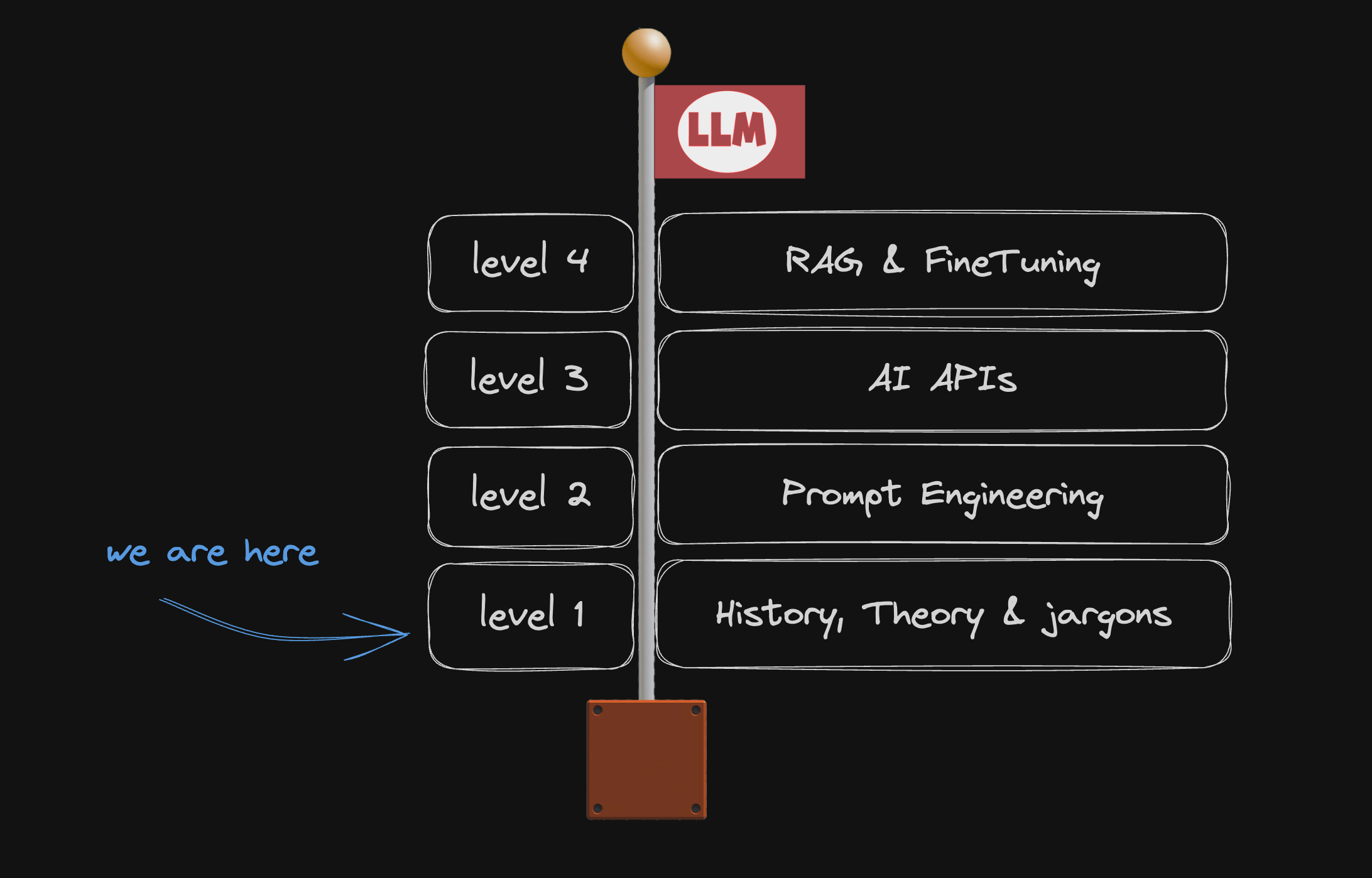
Note: this article is the 1st part of a series.
Where do LLMs come from anyway?
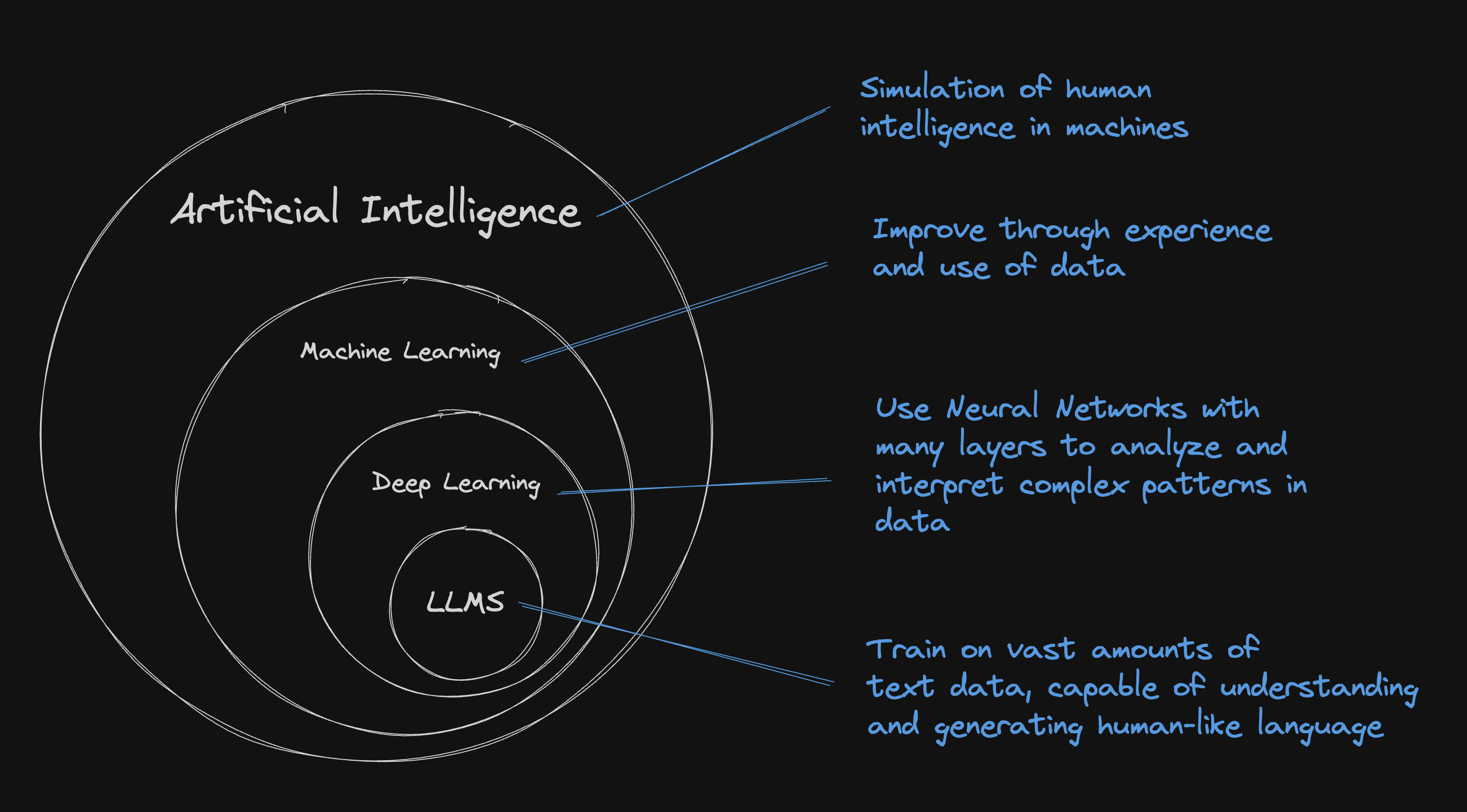
LLMs are machine learning models that are really good at understanding and generating human language.
They are specifically a subset of machine learning known as deep learning, which deals with mostly but not only algorithms inspired by the structure and function of the brain called artificial neural networks.
And... what's a Neural Network?
Neural networks consist of layers of neurons, each processing part of a problem. Neurons compute using inputs and weights which are key parameters adjusted during training to improve accuracy.
As the network processes data, it fine-tunes these weights to reduce errors in its output. This learning method enables the network to perform tasks such as image recognition or language understanding by efficiently handling complex data.
A brief look back: from complexity to accessibility
To appreciate where we stand today with technologies like ChatGPT, it's helpful to rewind and see the journey that led to these advancements.
Up to 2017 - RNNs & LSTMs
Initially, deep neural network models such as Recurrent Neural Networks (RNNs) and their advanced variant, Long Short-Term Memory Networks (LSTMs), were predominant. They are sequentially processing text, but they face two challenges :
Handling long sequences and fully understanding broader contexts was difficult.
Due to their sequential nature, RNNs and LSTMs are limited in their ability to be processed in parallel, affecting how much data you can effectively feed the model.
2017 - A Paradigm shift with transformers
The transformer model, introduced in the "Attention Is All You Need" paper, changed the landscape.
Unlike RNNs and LSTMs, transformers used parallel processing and an attention mechanism, handling context and long-range dependencies more effectively.
In brief, the transformer's attention mechanism allows the model to "focus" on different parts of the input data at once, much like how you focus on different speakers at a noisy cocktail party.
It can weigh the importance of each part of the input data, no matter how far apart they are in the sequence.
2018 - Post-Transformer
Transformers enabled us to move away from linear processing to a more dynamic, context-aware approach.
Two major milestones :
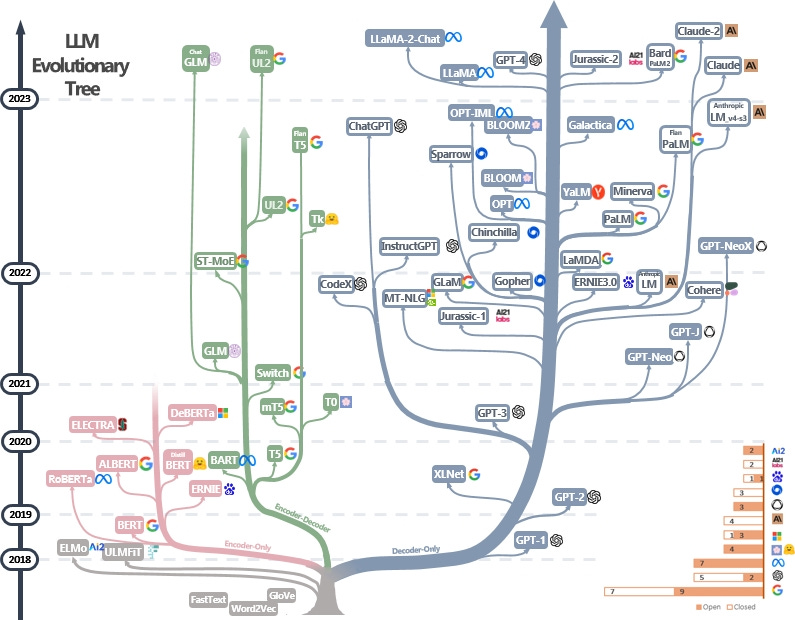
BERT: This model, focusing only on encoding, was great at getting the context right. It changed the game in areas like figuring out what text means and spotting emotions in words.
GPT: The GPT series, like GPT-3, which focused just on decoding, became famous for creating text that feels like a human wrote it. They're really good at many tasks involving coming up with new text.
But hold on, what exactly do we mean by 'encoding' and 'decoding'?
Encoder-decoder models combine input understanding and output generation, ideal for machine translation. For instance, in Google Translate, the encoder comprehends an English sentence, and the decoder then produces its French equivalent.
Encoder-only models like BERT are geared towards understanding inputs, excelling in tasks like sentiment analysis where deep text comprehension is essential.
Decoder-only models, such as GPT, specialize in generating text. They're less focused on input interpretation but excel in creating coherent outputs, perfect for text generation and chatbots.
Decoder-only models have become quite the trend because they're versatile and simpler to use. This makes them a favorite for all sorts of tasks, and they keep getting better thanks to improvements in how they're trained and the hardware they run on.

2021 - Multimodal era
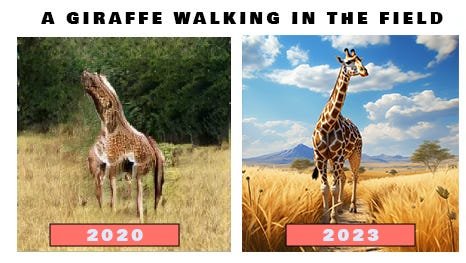
In 2021, with DALL-E's release, we saw the expansion of LLM capabilities, similar to those in GPT, into the realm of multimodal applications. 'Multimodal' means these models handle more than just text - they understand images too! DALL-E, built on the foundations of GPT, used its language understanding skills to interpret text and then creatively generate corresponding images. This was a big deal because it showed that the techniques used in text-based models like GPT could also revolutionize how AI interacts with visual content.
For reference, the below-left image was pre-DALL-E from a 2020 paper, and the one to the right was taken from today’s Midjourney. Things are moving fast.
2022 Release of ChatGPT and mass adoption
ChatGPT has become the user interface of AI, democratizing access for anyone who can type on a laptop - and it's free. It's also the fastest-growing application in history, reaching 100 million users in just two months.
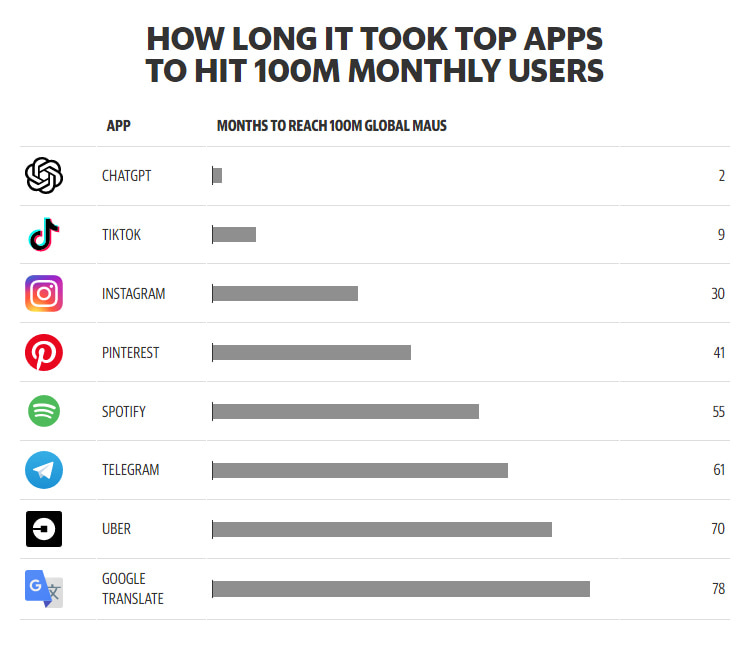
Since then, there's been an explosion of new models, both open-sourced (Llama2 , Mistral, etc) and proprietary (Claude, Cohere, etc), and a whole bunch of startups have sprung up. Not only have images become more impressive, but we've also started seeing things like text-to-video or text-to-audio. AI is branching out in so many directions, and this is just the beginning. Big players like Adobe are even integrating AI into their products, showing just how mainstream this technology is becoming.
The engineering behind ChatGPT
Let's now understand the key features of an LLM.
The prompt
So far, we know that LLMs are NN (Neural Network) that use transformers with specific strategies like attention mechanisms.
LLMs are like super-smart guessers. Imagine you're typing a text message, and your phone suggests the next word – that's a basic form of auto-complete. LLMs do this but on a much more complex scale.
Here's a simple example: If you type "The cat sat on the...", an LLM can predict the next word might be "mat" because it has learned from a huge amount of text that "mat" often follows this phrase. It's not just guessing randomly; it's using patterns it has learned from all the data it's been trained on. So, a good text input strategy helps LLMs make even better guesses, making conversations or writing more fluid and natural.
The text we put into LLMs is called a prompt. Crafting effective prompts can be challenging because there's no one-size-fits-all method; it varies based on the model used. Even the order in which you write your prompt can significantly impact the output, making the process of writing good prompts somewhat unpredictable.
However, several techniques can help, such as:
Zero-Shot Learning: Giving the model a task or question without any previous examples. For instance, asking "What is the capital of Germany?" without providing any prior context or examples.
Few-Shot Learning: Providing the model with a few examples before asking your main question. For example, showing a couple of examples of animals and their habitats, then asking, "What is the habitat of a polar bear?"
Chain of Thought: Writing out a step-by-step reasoning process to guide the model. If you ask, “How many hours are in three days?” you might start with "One day has 24 hours, so three days would have..."
Next to these techniques, there are many frameworks for creating good prompts. OpenAI just released their prompt engineering guide. But the best way to master prompt writing is through experimentation!
The lifecycle of a model
There are roughly 4 steps in the lifecycle of a model
Data collections and preparation : Gathering and processing relevant data to ensure it is clean, representative, and in a format suitable for training the model.
Training : Feeding vast and diverse text datasets into the LLM to learn complex language structures, nuances, and contextual relationships, enabling it to understand and generate human-like text.
Fine-tuning : After initial training, the model is fine-tuned with more specific datasets or for particular tasks. This could involve training on specialized topics or styles to enhance performance in certain areas.
Inference : applying the trained LLM to interpret, generate, or respond to new text inputs.
Essentially, ChatGPT is a fine-tuned model! We differentiate between a base model and an assistant model, with the latter being a more evolved form. This assistant model represents a refined version of the base model, specifically enhanced or adjusted to excel in certain tasks or contexts. Roughly speaking, the assistant model is a more user-centric and task-specific iteration of the base model, designed to efficiently handle particular interactions or functions.
The components of an LLM
Context window
The context window refers to the number of tokens (the smallest units of text, like words or parts of words) the model can consider at once, both in its input and output. This window defines the limit on how much prior text (input tokens) the model uses for understanding and how much it can generate (output tokens) in response. The size of this context window is crucial as it defines the model’s ability to comprehend longer contexts and maintain coherence in both its processing and generation of language.
For instance, ChatGPT 4 can handle 32k tokens. This means the model can consider approximately 32k tokens at a time, combining both the input and output.
You can easily roughly estimate that 1 word =~ 1.5 token.
Neural Network
Taking Llama2 as an example, the complexity of coding needed for its neural network depends on several factors like implementation details, optimization, and specific features used. Large language models like Llama2 usually use high-level languages and frameworks (like Python with TensorFlow or PyTorch), which simplify much of the complex stuff.
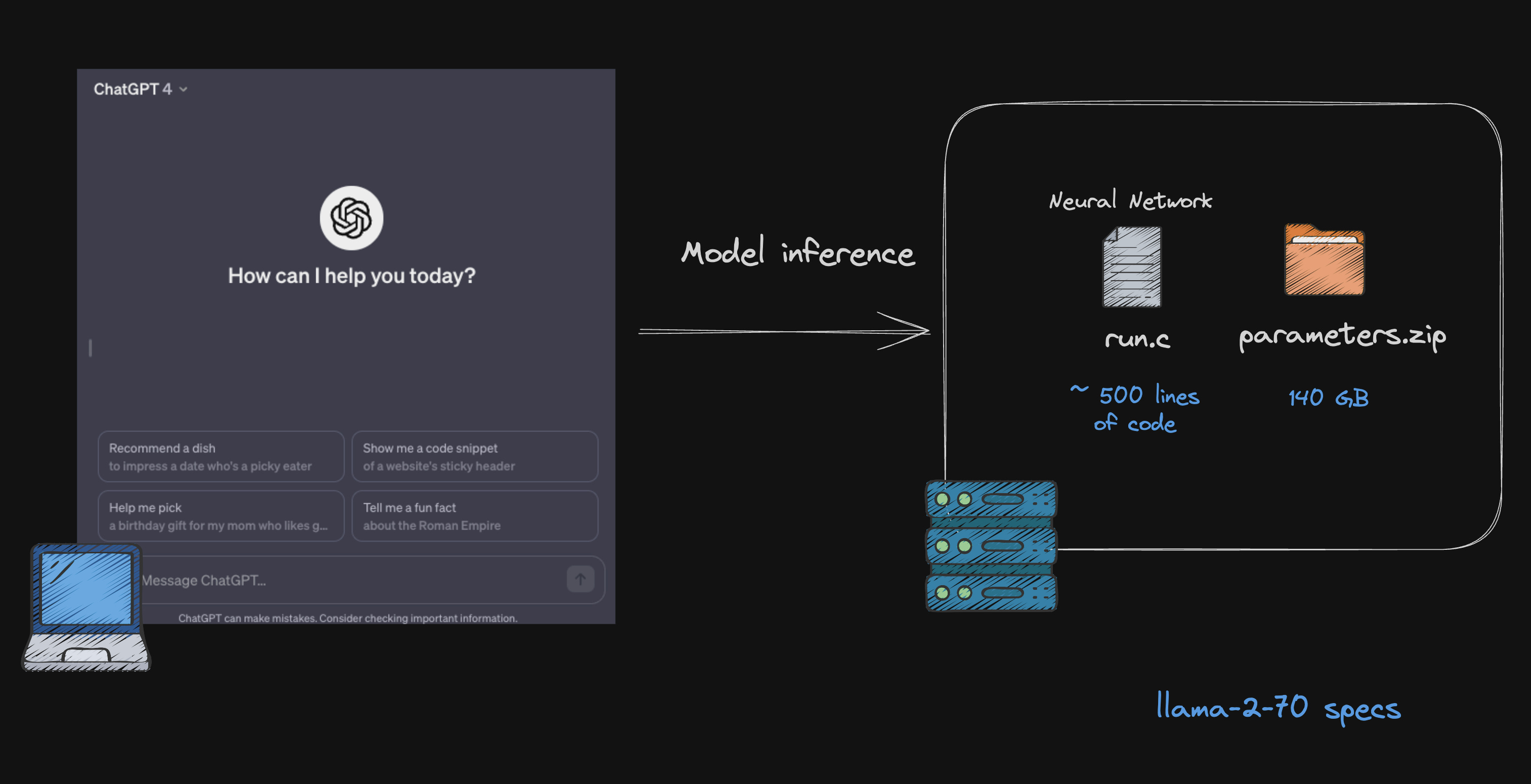
Running a Neural Network is similar to executing a run.c file, regardless of the programming language. Imagine it as a script around 500 lines long. Once you understand how it works, you'll find operating the neural network quite manageable.
Parameters
The real complexity of an LLM lies in its parameters, which are key to defining the model. These parameters are developed during training. Essentially, training involves feeding the model a vast amount of data, allowing it to learn and adjust its parameters for better performance. These parameters include weights and biases that the model uses to make predictions or generate text.
The Llama2 series, like many AI models, comes in different sizes of parameters.
The current norm in the world of LLMs is to have models with billions of parameters. When we say a model has billions of parameters, it's like saying it has billions of bits of information or rules to help it understand and predict language. For instance, when we talk about Llama-2-70, the "70" means it has 70 billion parameters.
Training this 70 billion parameter model of Llama2 requires over 1 million GPU hours. If you were to use 1,000 GPUs in parallel, it would take about 70 weeks to train this model. The cost? A hefty $8 million.
Often, the weights or parameters of models like Llama2 are typically saved in specific file formats for sharing. A common format is .pth, which is used with PyTorch. There's also a lot going on about this file formats like GGUL and GGML.
Running a model on your laptop
Now that we've got a handle on the basics, it's time to run our first model.
Thanks to the surge in open-source projects like Llama2 and Mistral, we've got many tools to help us run these models right on our laptops. While big cloud platforms and services like HuggingFace are often the go-to for hosting LLMs, there's a lot of progress in making it possible to run them efficiently on your own computer, using the full potential of your CPU and/or GPU.
Ollama is a great example that lets you run, create, and share large language models with a command-line interface.
You can think of it as "Docker for LLMs".
Setup
If you are on MacOs, you can use brew package manager to install
brew install ollama
Or visit their download page for other distribution.
Download and running a model
Let's say we want to try the famous latest Mixtral 8x7B from Mistral, we simply have to do :
ollama run mixtral
Time to get your coffee ready! The first time you run the command, it's going to download the model, which is a 26GB file size.
Once that's done, you can simply type in your prompt and press enter!
Of course, you can run many other supported models. Have a look at their model library.
Two great resources to help you choose the right model are:
lmsys.org : which offers a user-friendly interface to test different LLMs and also features their own leaderboard.
Onward and Upward
Well done! You've navigated through the complex jargon and now have a solid grasp of the key elements in the world of LLMs. Plus, you've even managed to run a model on your own computer!
What's next? Only the exciting stuff. In the upcoming blog, I'll explore how to craft effective prompts and explore various techniques to make the most of LLMs.
Stay tuned for level 2 🧗♂️ !